How to follow, copy, and share trades in MetaMask
Social trading allows you to follow, copy, and share trades directly in your wallet. You need a social profile to get started. See our guide here.
Always do your own research. Nothing in the social feed is financial, investment, legal or tax advice or endorsed or guaranteed by MetaMask, including posts that appear in 'Trending' or from verified traders, including badges. Past performance doesn't predict future results, trading involves risk, including the possible loss of your funds. All users act independently of MetaMask and do not act in a capacity as agents or advisers of MetaMask, including where a user is a current or former employee of MetaMask trading on their own account.
Availability varies by region. Copy trading isn't available in the UK. Copying perps trades follows the same regional availability as perps trading in MetaMask, powered by Hyperliquid.
The social feed
Access the social feed by tapping 'Social' in the bottom bar. You can navigate through four different tabs: Trending, Following, Leaderboard, and Live. Add custom filters to narrow the feed—options vary by tab and include asset type, open or closed positions, and market cap.
- Trending: Popular posts including those from accounts you do not follow.
- Following: Posts from accounts you follow. If you aren't following anyone yet, you'll see suggested traders to follow.
- Leaderboard: Traders ranked by realized P&L.
- Live: A real-time feed of new trades as they are published.
Each post has a position attached to it. A post shows the trader's username, their 7-day P&L and win rate, comment, and their trade in a position card. This includes details like the asset, direction and leverage (for perps), current price, P&L, entry price, hold time, and cost (the initial margin for perps or the amount paid for a spot trade).
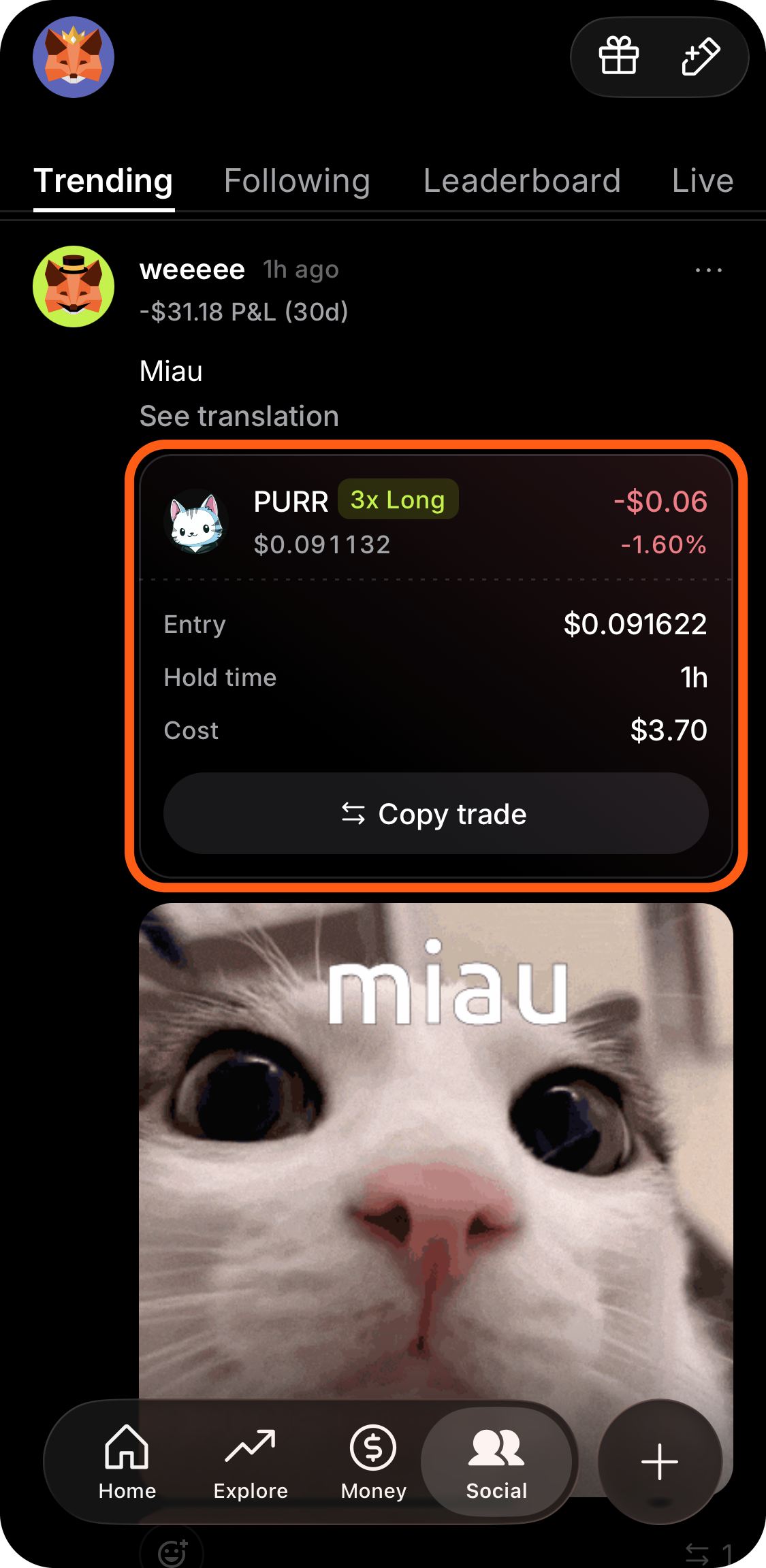
You can react to posts, share them, and choose trades to copy directly from the feed. The counter at the bottom right of a post shows how many people have copied the trade.
If a post is in a language other than English, tap 'See translation' to translate it to English. Support for other languages will be coming soon.
Finding and following traders
You can find traders in the social feed or through a profile link someone shares with you.
Tap a trader's username or avatar to view their profile. A profile shows the 30-day stats of their linked account: Realized and unrealized P&L, win rate, wins and losses, average hold time, and volume. These stats cover trades over $10 that the linked account made in the last 30 days, whether or not the trader posted about it.
You can also browse through their open and closed positions and their posts.
To follow a trader, tap 'Follow' on their profile. Their posts will appear in your 'Following' tab. To stop following them, open their profile and tap 'Unfollow'.
If a trader has turned off 'Show trading activity', their profile is private, so you can't find or follow them and their activity doesn't appear in your feed. If you already follow them, you'll keep following them but won't see anything new until they turn it back on.
How to copy a trade
-
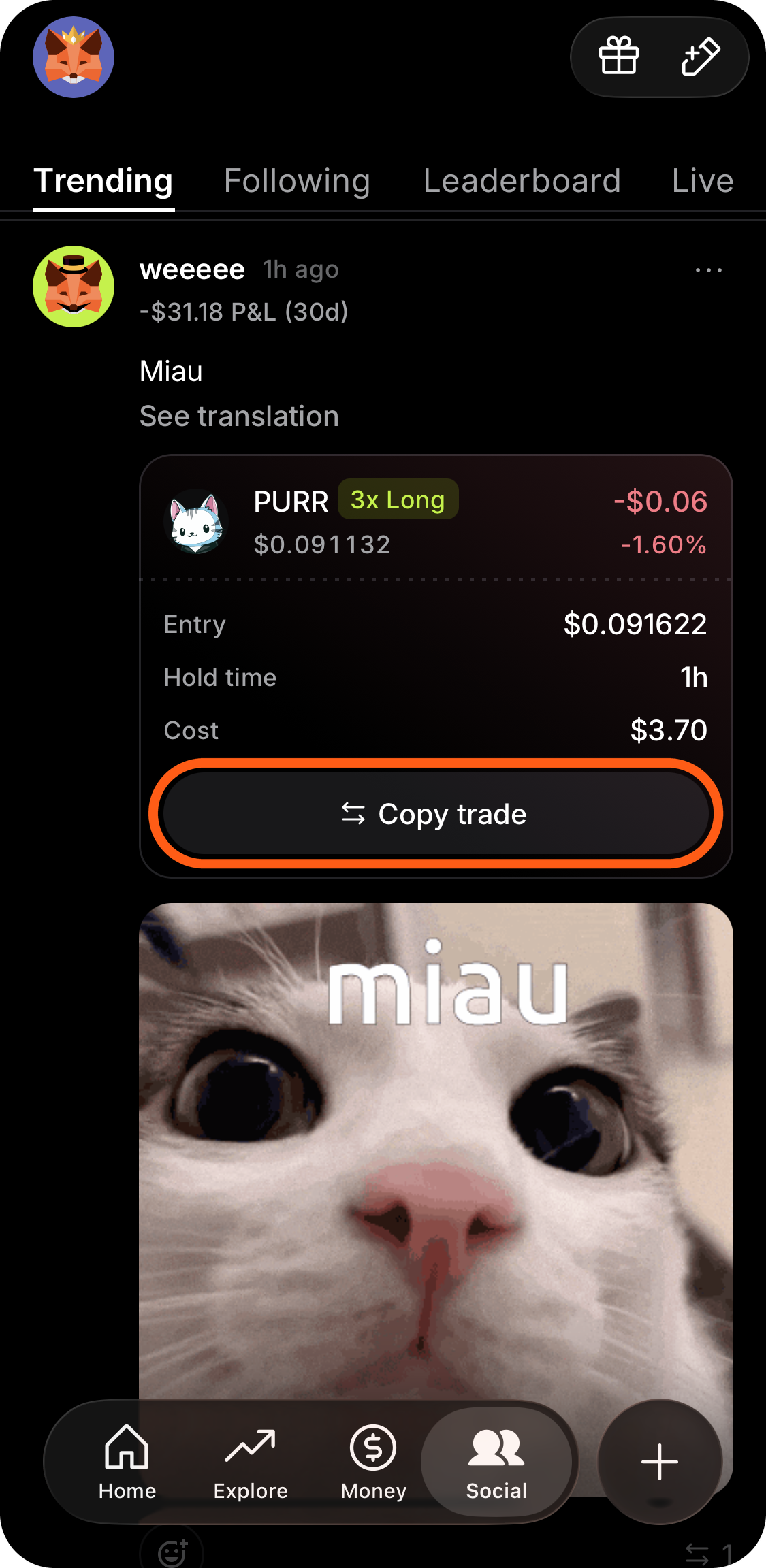
Tap 'Copy trade' on the position you want to copy in the feed.
-
Set your amount with the slider and adjust any trade settings, such as the order type (market, or limit for perps), leverage, auto close (take profit and stop loss), or what you pay with: money account, perps balance, or crypto.
- Note: Minimum order size is $10.
-
Review the details, including fees and liquidation price, and confirm.
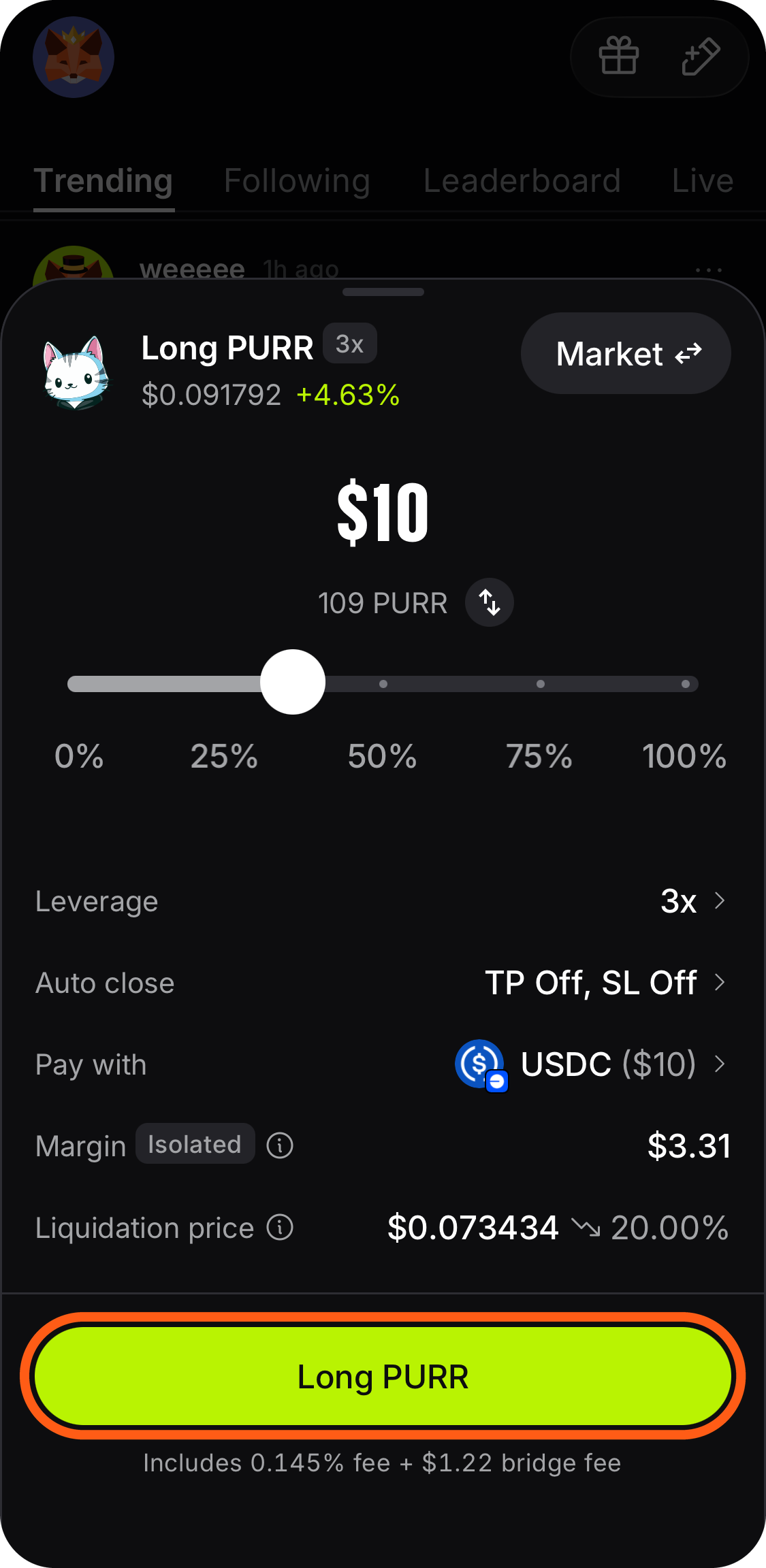
Copying opens your own position at the current market price. The cost, hold time, and P&L on the post describe the original trader's position, not yours, so your entry price and outcome may differ. You manage your position yourself, including when to close it.
A post only shows trades a trader has chosen to share from their linked account, so a visible position may not reflect their full exposure.
You won't see the copy trade button if:
- The trader has closed their perps position. You can still tap the position card and open your own long or short with your own settings.
- The trade is a sell of a token you don't hold.
- It's your own post.
- Copy trading isn't available in your region.
If a token has been flagged as suspicious or malicious, you'll see a warning and need to confirm before the trade goes through.
There's no extra fees for copying a trade this way. The standard MetaMask fee applies, and the trader you copied earns up to 15% of eligible fees, paid from MetaMask's share. See How social rewards work for details.
How to post a trade
- Tap the pencil icon in the social feed or 'Create a post' from your profile page.
- Choose the swaps or perps position you want to share and add your comment and/or GIF.
- Tap 'Post.'
After a regular trade within your wallet, you may also see a prompt to share it to the feed.
You can only post a trade you've already made like a previous swap, or an open or closed perps position. You need 'Show trading activity' turned on within your profile settings to post.
Only some trades can be posted. For swaps, a position appears in the list if it includes a trade of $10 or more on Ethereum, Base, BNB Chain, Solana, or Robinhood, except stablecoins and native tokens such as ETH or SOL. For perps, you can post a position of $10 or more in any available market.
When someone copies your trade, you earn up to 15% of their eligible fees. You can claim it from the rewards hub. See How social rewards work for details. Rewards aren't available in the UK.
Sharing a post outside of MetaMask
To share a post with someone, tap the share icon below it. You can copy a link to the post or send it directly to Telegram, X, Messages, or another app. Anyone with a social profile set up who opens the link will see the post, can follow the trader, or copy the trade. Those without a social profile will see a preview of the trader and can join social to get started.
Moderation, reporting, and questions
Posts and profiles must follow the MetaMask Social Supplemental Terms of Use. Don't post anything abusive, misleading, or spam, and don't impersonate others.
We, our service providers, and our automated and AI-powered tools may review posts and profiles. Content that does not comply with our Terms may be removed, and accounts may be restricted. If required by law, we'll give you the reasons for our decision and an opportunity to appeal.
Reporting a post or profile
- To report a post, tap the three dots on it and select 'Report post'.
- To report a trader, tap the three dots on their profile and select 'Report user'.
- To stop seeing a trader's posts, tap the three dots on their profile and select 'Block user'.
Questions and complaints
If you have a question or complaint about social features, social content, or a moderation decision, contact us at MetaMask Support.
Illegal content or content that infringes your rights
If you believe content is illegal or infringes your copyright, trademark, privacy, or other rights, email [email protected]. See section 8 (Complaints) of the MetaMask Social Supplemental Terms of Use for what to include in your notice.
FAQ
Is there a fee for copying a trade?
No extra fees. The standard MetaMask fee applies to your trade, including any network fees and the trader you copied earns up to 15% of eligible fees from MetaMask's share.
What positions can I post?
For swaps, a trade of $10 or more on Ethereum, Base, BNB Chain, Solana, or Robinhood, except stablecoins and native tokens such as ETH or SOL. For perps, you can post a position of $10 or more in any available market.
Why can't I see the 'Copy trade' button?
You can only copy open perps positions, and you can't copy a 'sell' for a token you don't own. You also won't see it on your own posts, or if copy trading isn't available in your region.
If the trader I copied closes their position, does mine close too?
Can I delete a post?
What happens if a post breaks our Terms?
Posts are screened automatically, and posts that are flagged or reported are reviewed by our support team. A post may be removed, and the account may lose the ability to post.
What does the verified badge mean?
Verified badges are in limited access for now, so you'll only see them on a small number of profiles. Verified badges are not an endorsement or representation by MetaMask of any particular account, and may only represent certain attributes as indicated from time to time on the Social Features. All traders act independently of MetaMask and do not act in a capacity as agents or advisers of MetaMask, including where a trader is a current or former employee of MetaMask trading on their own account
Can I see who copied my trade?
The counter on your post shows how many people have copied it. You'll also get a notification when someone copies your trade.