Getting started with social trading
Social trading lets you connect with other traders, learn more about their on chain activity and copy the trades you choose from a built-in social feed in MetaMask. Like your favorite social networks, you can set a username, follow people, and post. Unlike those social networks, it's built for trading: you can copy someone's trade directly, share your own positions, and earn rewards when others copy you, all self-custodial.
This guide covers creating and managing your social profile. If you've already set one up, see How to follow, copy, and share trades and How social rewards work.
This experience is available in MetaMask Mobile v8.21.0 and above in the 'Social' tab of the bottom bar. Availability varies by region. Copy trading isn't available in the UK. Copying perps trades follows the same regional availability as perps trading in MetaMask, powered by Hyperliquid.
Always do your own research. Nothing in the social feed is financial, investment, legal or tax advice or endorsed or guaranteed by MetaMask, including posts that appear in 'Trending' or from verified traders, including badges. Past performance doesn't predict future results, trading involves risk, including the possible loss of your funds. All users act independently of MetaMask and do not act in a capacity as agents or advisers of MetaMask, including where a user is a current or former employee of MetaMask trading on their own account.
Creating a social profile
You can create a profile by connecting your X account or by setting one up manually. Either way, you'll need to review and agree to MetaMask's Social Supplemental Terms of Use and Privacy Notice.
Connect with X
- Select 'Connect an X account.'
- Authorize MetaMask on X. You'll be asked to choose which X account to connect.
- Choose your username and avatar. You can use your X username and profile picture, or turn off the toggles to enter your own username and choose an avatar. Your username is permanent and can't be changed, so pick carefully.
- Pick the account to link with your profile from your account list and choose whether to show your trading activity.
- Tap 'Continue' to finish creating your profile.
Creating a profile manually
- Select 'Create a profile manually.'
- Claim your username or tap the dice for a random suggestion, and set a display name. Your username is permanent and can't be changed, so pick carefully.
- Choose an avatar.
- Pick the account to link with your profile from your account list and choose whether to show your trading activity.
- Tap 'Continue' to finish creating your profile.
Your profile is ready. Learn How to follow, copy, and share trades and how to earn up to 15% of eligible fees in rewards when someone copies your trade.
Linking an account and trading activity
Your social profile is linked to one MetaMask account. Your account address is not shown on your profile. You can change your linked account every 30 days; this resets your trading stats, such as P&L and win rate.
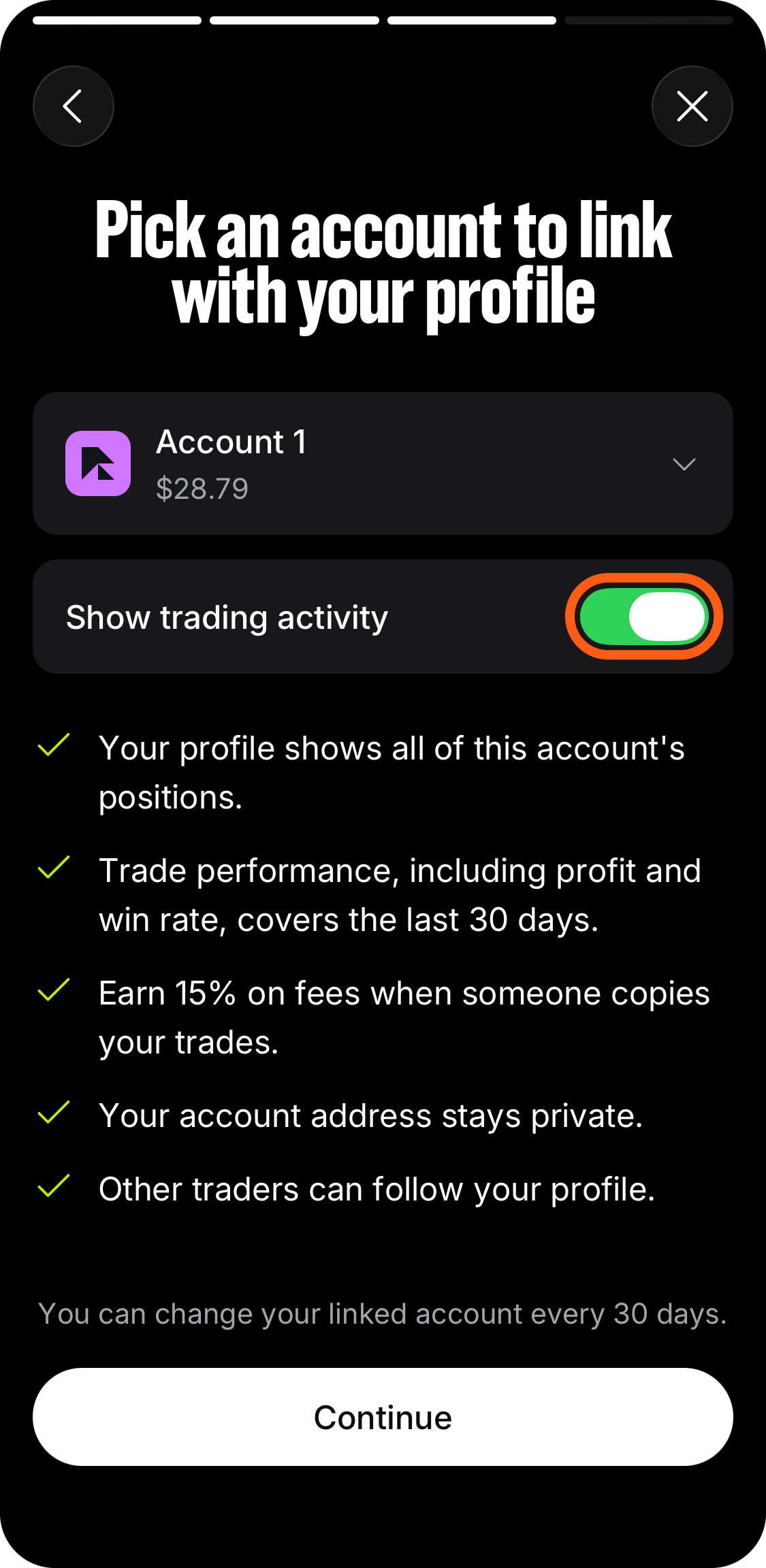
Your profile only shows trades made through your linked MetaMask account. It doesn't show activity from your other accounts or wallets. (Imported private key accounts and hardware wallet cannot be chosen as a social trading account.)
To adjust privacy settings, tap 'Edit profile' > 'Trading activity' > toggle 'Show trading activity' to your preference. Your account address is private.
With 'Show trading activity' turned on, your profile shows your 30-day stats, including P&L and win rate, and all of the linked account's positions over $10. Your stats cover trades your linked account made in the last 30 days, whether or not you posted about it. You can also earn up to 15% of eligible fees when someone copies your trade.
With 'Show trading activity' turned off, your profile is private: other traders can't find, search for, or follow you, and your activity doesn't appear in the feed. You can't post, but you can still browse the feed, react to posts, and copy trades. If you already have followers, you keep them. They won't see anything new from you and can still unfollow you, and your follower count stays on your profile.
If you turn 'Show trading activity' back on, your past history becomes visible again. MetaMask rebuilds your stats from your previous activity, including trades made while your profile was private.
Editing your profile
From your profile, tap 'Edit profile' to change your display name, bio, or avatar. Display name is separate from your username and can be changed at any time. Your username can't be edited.
To change your avatar, tap the pencil icon on your picture, then pick a fox and background color, or tap the dice to generate a random one.
Usernames
Usernames are permanent and cannot be changed, even if your X username (if connected) changes later. If a name is taken, choose a different one. Usernames are first come, first served and MetaMask can't transfer usernames for you.
Usernames must comply with MetaMask's Social Supplemental Terms of Use. Offensive usernames aren't allowed, and neither is impersonating a brand, trademark, or another person. Profiles that break these rules may be removed. See here for more.
Connecting or disconnecting X
You can connect or disconnect an X account at any time from 'Edit profile' > 'X account'.
Connecting X after creating a profile manually adds your X username to your profile and lets you use your X profile picture as your avatar. It doesn't change the MetaMask social username you chose.
Disconnecting X removes your X username from your profile. If your profile picture came from X, it's replaced with a random avatar. Your username, posts, bio, linked account, and privacy settings stay the same, and you can reconnect at any time.
Deleting your social profile
There isn't currently an option to delete your social profile in the app. To hide your trading activity, including your positions and stats, edit your profile settings and toggle off 'Show trading activity'. To request deletion of your profile, you can reach out to our support team.
FAQ
Can I link more than one trading account?
No. You can only link one account per profile. You can switch your linked account every 30 days. Note: This will reset your trading stats like P&L and win rate.
Can other people see my wallet address(es)?
No. Your linked trading account address is not shown, whether trading activity is on or off. Other traders only see trades made through your linked account, not your activity in other accounts or wallets.
Can I change my username?
The username I want is taken. What can I do?
Choose a different, available one. Usernames are first-come, first-served. We can't transfer or release usernames. If you feel as though an account is impersonating you, report the profile and reach out to our support team by starting a conversation with us.
Do I have to connect X?
No. You can create a profile manually. Connecting X just adds your X username to your social profile and lets you use your X profile picture.
What happens when I disconnect X?
Your X username is removed from your profile and, if your avatar came from X, it's replaced with a random fox avatar. Everything else stays the same, including your MetaMask social username. You can reconnect at any time.
How do I report a post or block a user?
Tap the three dots on a post, then select 'Report post'. You can report impersonation, abuse, spam, or anything that looks misleading. To report or block a trader, tap the three dots on their profile, then select 'Report user' or 'Block user'. Blocking hides their posts from you and unfollows them.
If I turn off trading activity, can people still follow me?
No new people can. With 'Show trading activity' turned off, your profile is private. Other traders can't find, search for, or follow you, and your activity doesn't appear in the feed. Your existing followers are kept, but they won't see anything new from you and can still unfollow you.